Help contents
Find
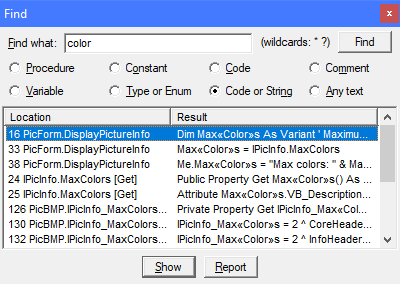
The Find window offers an extended VB code search capability. You can search for code, comments or the name of a program object. Press Ctrl+F to open the Find window. Press F3 to Find again.
Search term
You can use the following wildcards in the search term:
* matches any string.
? matches any single character.
# matches any single digit [0-9].
[ax-z] matches a single character in the list.
[!ax-z] matches a single character not in the list.
The syntax is equal to the VB6 Like operator. Tips: To search for *, write [*]. To search for ?, write [?]. To search for #, write [#].
Search options
- Procedure
- Find procedure by name. You can also search in binaries (DLL, COM procedures).
- Variable
- Find variable by name.
- Constant
- Find constant by name.
- Type or Enum
- Find Type (UDT) or Enum by name.
- Code
- Find text in code, but not in comments or string literals.
- Code or String
- Find text in code or string literals, but not in comments. Note: To search for a string literal such as "abc", use this option.
- Comment
- Find text in comments only.
- Any text
- Find text in any of code, comments and string literals.
Results list
Double-click a search result to view it. Press the Report button to create a report of the search results.
Suggested uses
- Search for code that was commented out
- When you need to find certain code that has been commented out earlier, use the Comment search option.
- Search for code that was not commented out
- Use the Code search option to ignore comments (and any code in them).
- List API callback functions
- Find AddressOf in Code. This works mainly with classic VB, which doesn't use
AddressOf for any other purpose.
- List Operators or Custom Events
- Find Operator or Custom in Code.
- Locate all compound operators used (
+= etc.)
- Find [-+\/*^&]= in Code. This does not find
<<= or >>= though, which you need to find separately.
- Search for hard-coded file names
- Find "*.[!"][!"][!"]" in Code or String.
- Search for hard-coded date or time literals
- Find [#]*[/:]*[#] in Code.
Note
Search for code, comment, string or text does not return any matches in binary files. Search for names of procedures, variables, constants, Types and Enums returns names found in all files, whether source or binary.
See also
Listings windows and the Constants and Enums window let you search for procedures, constants, enums, variables, parameters and modules in a more detailed way.
©Aivosto Oy Project Analyzer Help