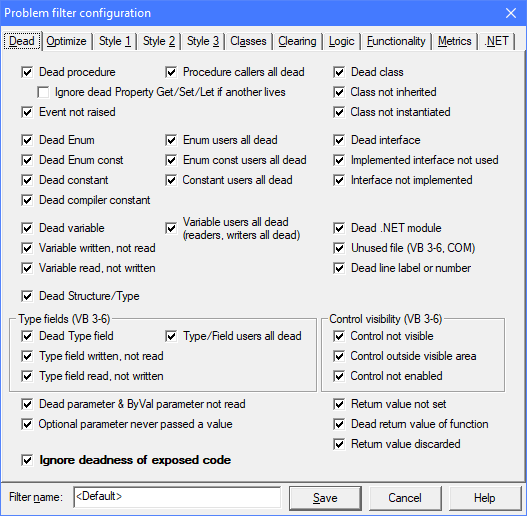
Selecting dead code rules in Problem options
Dead code means unnecessary, inoperative code that can—and should—be removed.
Dead code detection is a set of code review rules Project Analyzer runs to search your code for unused and partially unused items.
Dead code leads to excessive memory use and slower execution. It also means more source code to read and maintain. This leads to higher costs, especially during maintenance. If the code is in there, programmers must spend time trying to understand it. Leaving dead code in a completed project often means carrying untested code around. Dead code may inadvertently become operative later, which is a possible source for errors. Dead code exaggerates system size measures such as line counts, and may even lead to purchases of unnecessary code at a high price. Thus, one of the first things to do when taking on new projects is to reduce their size.
By eliminating dead code you can make your program smaller and easier to understand. In addition, you can find logical flaws and prevent new errors from being introduced in the future.
Dead, superfluous code comes in several flavors:
To remove dead code, go through each reported dead code warning. Delete or comment out the useless parts. You can also run Auto-fix to eliminate some of the dead code automatically.
Selecting dead code rules in Problem options
Dead procedure/declaration/event. A procedure, a DLL declaration or an Event declaration is not used by the project. It is not called by the code nor executed by any other means. You may remove it if you are sure you won't need it later. The removal doesn't affect the functionality of your program. Event declarations are reported dead only if they are not raised nor handled. See the problem Event not raised for events that would be handled but that aren't fired. DEAD_PROC, DEAD
The deadness status of property accessors (Get, Set, Let) can differ. As an example, a property may be written to but never read from. You may still want to keep the property as read/write and not delete the unused Get accessor. To ignore these half-dead properties by checking the checkbox Ignore dead Property Get/Set/Let if another lives. This ensures that a property will be reported as dead only when all the accessors are dead.
Procedure callers all dead (called by dead only). A procedure is not executed and it is effectively dead. Calls to the procedure exist, but the callers don't execute. You should remove this procedure along with its callers, provided that you are sure you won't need any of the callers later. DEAD_PROC, DEAD
Event not raised. An event does not fire. The class does not call RaiseEvent to raise the event. All existing event handlers are not executed. NOT_RAISED, DEAD
Dead Enum. An Enum is not used as a data type. The constants defined by the Enum are not used either. You may remove this Enum if you are sure you won't need it later. — Even though a dead Enum does not affect the functionality of the program, its member constants may become obsolete or incomplete in time. These problems are not apparent before the Enum is brought back to use again. It is better to comment the Enum out or delete it to avoid these problems. DEAD, DEAD_ENUM
Enum users all dead. An Enum is used as a data type, but the users are all dead. The values in the Enum never appear at run-time. If the values SHOULD be used, the program contains a flaw. Alternatively, this is a leftover from removed or disabled functionality. Consider deleting the Enum along with the user procedure(s). DEAD, DEAD_USERS
Dead Enum constant. An enumeration constant is not used. You may have forgotten to use it, or it is useless in this application. You should verify which case it is. If it is useless, you may remove it if you are sure you won't need it later. The removal doesn't affect the functionality of your program. You may consider keeping this constant available for the sake of completeness or later use, though. Note that removing a constant from an Enum may change the values of the constants that come after it, causing side effects. When removing an Enum constant it is safest to explicitly define a value for the next constant to prevent breaking existing code. The code may rely on the specific numeric values of the enum constants. DEAD, DEAD_ENUM_CONST
Dead constant. The value of a constant is not used. You may have forgotten to use it, or it is useless in this application. You should verify which case it is. If it's useless, you may remove it if you are sure you won't need it later. The removal doesn't affect the functionality of your program. You may consider preserving the constant for the sake of completeness or later use, though. The best way to achieve this is to comment it out. The commented constant is clearly reserved for future purposes and not being used at the moment. — An extra string constant bloats the executable size while an extra numeric constant simply bloats the source code and makes it harder to understand. A dead constant may also have an obsolete value, which is not apparent before the constant is brought back to use again. These are the reasons why dead constants should be cleaned out even though they don't affect the functionality of the program. DEAD, DEAD_CONST
Dead compiler constant. A compiler constant is defined, but it is not used for conditional compilation. You may have forgotten to use it or it may have fallen out of use due to modifications made to the code. You may remove the definition without affecting the code under analysis. If it's a #Const, removal will have no effect on the code. If the constant is defined in project settings, removal could theoretically have an effect. This would only happen if a file referencing the constant were later added to the project. COMPCONST, DEAD, DEAD_COMPCONST
Constant/Enum constant users all dead. The value of a Const or an Enum constant is not used at run-time. Even though the constant name is referenced in the code, the respective procedures are dead. The constant value is effectively dead too, because it is not used for anything. If the constant value SHOULD be used, the program contains a flaw. Alternatively, this is a leftover from removed or disabled functionality. In that case consider deleting the constant along with the user procedure(s). Note, however, that deleting a constant from an Enum might render the Enum incomplete or change other values in the same Enum. To avoid breaking existing code, you may want to keep useless constants in the Enum. DEAD, DEAD_USERS
Dead variable. A variable is not used. You may remove it if you are sure you won't need it later. The removal doesn't affect the functionality of your program. Before removal, you might want to determine why the variable actually is superfluous and whether it represents missing functionality or the remains of some deleted functionality. — A dead variable consumes memory and makes the program harder to understand. That is why dead variables should be removed even though they don't affect the functionality of the program. DEAD, DEAD_VAR
The following 5 rules are all enabled by a single checkbox Variable users all dead.
Variable users all dead. A variable seems to be in use, but it is not. The user procedures never execute because they are all dead. As a result, the variable is completely unused and useless at run-time. If you remove all the user procedures, this variable will stay as a leftover unless you delete it. Use this rule to hunt for related pieces of dead code that you can remove at the same time. Right-click the variable name and select References to see the dead users. If the variable seems useful, some features may be missing from your program. Consider bringing the variable back to life by calling the dead users. DEAD, DEAD_USERS
Variable readers all dead. A variable is being read and written. The reads never execute because the reader procedures are all dead. One or more writes do execute, but it is to no benefit. This is either a problem in your program or a good place for optimization. Check to see if not reading the variable indicates a logical fault. It could indicate missing or removed functionality. You may need to bring the dead readers back to life by calling them, or add new read statements in the live part of your code. If there does not seem to be a fault, consider dropping the writes. Your code possibly does some unnecessary work in getting the right value to the variable. Remove the unnecessary parts to optimize your code. DEAD, DEAD_READERS
Variable writers all dead. A variable is being read and written. The writes never execute because the writer procedures are all dead. One or more reads do execute, though, indicating a flaw in the program. The value read is always zero, empty or Nothing, depending on the data type. Review the code to see if this is causes an error at run-time. Determine whether one of the dead writer procedures should be called to bring the variable back to full life, or whether you should add a new write statement to give the variable a real value. - This type of flawed dead code is really hard to catch without Project Analyzer. The problem is especially nasty for object variables, because the object will always be Nothing. This can cause an 'Object variable not set' error when the variable is referenced. DEAD, DEAD_WRITERS
Variable not read, writers all dead. A variable is practically unused and useless. It is never read. Write statements do exist, but they never execute because the writer procedures are all dead. The variable looks like a leftover from previous functionality. There is no point writing values to the variable any more, since there are no reads from it. Consider deleting the dead writers along with the variable. Removing useless parts helps maintenance. DEAD, VAR_NOT_READ, NOT_READ
Variable not written, readers all dead. A variable is practically unused and useless. It is never assigned a value. Read statements do exist, but they never execute because the reader procedures are all dead. The variable looks like a leftover from previous functionality. The dead readers may contain a hidden bug (dead bug, so to say). The readers may perform in an unexpected way since the variable never gets any useful value other than zero, empty or Nothing. Taking the readers back to use can bring the bug to life. Consider deleting the readers along with the variable. Removing questionable, useless parts helps maintenance. DEAD, VAR_NOT_WRITTEN, NOT_WRITTEN
Variable written, not read. A variable is given a value but the value is never read by the program. The variable is either useless or there is a flaw in the program. Review the write locations. Check the code to determine if it's a flaw or if the variable is simply a leftover from an earlier version. Remove the variable and the write statements if you are sure the variable is useless. Before removal, determine if the write statements contain any procedure calls that must execute. Removing these calls could make the program behave erroneously. DEAD, NOT_READ, VAR_NOT_READ
Variable read, not written. A variable is never written to, even though its value is read by the program. The value is always zero, empty or Nothing, depending on the data type. Review the code to see if the missing write is a flaw in the program or if it is intentional. The write statement(s) may have been deleted by accident or the developer forgot to add them in the first place. In this case one or more writes should be added. On the other hand, the write(s) may have been removed on purpose, in which case the variable now works as a constant. Consider removing the variable altogether or declaring it as a constant. The use of a constant prevents unexpected changes later in the life-cycle of the program. You can also save a little memory as constants don't require run-time data storage. — This review rule is especially important for object variables, because the variable will always contain the value Nothing. This can cause an 'Object variable not set' error at the location the object is referenced. A special case is denoted as 'No real value given, cleared/allocated only'. For an object variable this means the variable is set to Nothing but it never contains a live object. Alternatively, an array is allocated but nothing is stored in it. The array is consuming memory for no purpose. DEAD, NOT_WRITTEN, VAR_NOT_WRITTEN
Data structures are defined with the Type..End Type block in VB 3-6 and Structure..End Structure in VB.NET. The Type field rules are for VB 3-6 only. Fields of VB.NET Structures are regular variables. They are handled via the regular variable rules above.
Dead type field. A field in a user-defined type is not used by your code. You may have forgotten to use the field. It may also be useless or unused on purpose. Carefully consider the reason before removing the field. You need to review the use of the entire user-defined type. If it is being used in random file access or external DLL calls, changing the type may break the file structure or the calls. - This problem rule applies to VB 3-6 only. Fields of VB.NET Structures are handled via the rule Dead variable. DEAD, DEAD_FIELD
The following 6 rules are all enabled by a single checkbox Type or Field users all dead.
Type users all dead. A user-defined type is used as a data type, but the users are all dead. It is effectively dead. Consider deleting the Type along with the user procedure(s). This rule applies to the Type block in classic VB. DEAD, DEAD_USERS
Type field users all dead. DEAD, DEAD_USERS
Type field readers all dead. DEAD, DEAD_READERS
Type field writers all dead. DEAD, DEAD_WRITERS
Type field not read, writers all dead. DEAD, FIELD_NOT_READ, NOT_READ
Type field not written, readers all dead. DEAD, FIELD_NOT_WRITTEN, NOT_WRITTEN
These "all dead" problems are similar to the variable related "all dead" problems. See the descriptions above.
Type field written, not read. A field in a user-defined type is written but not read by your code. This may indicate a useless field or incomplete functionality. Carefully consider removing the field. Before removal you need to review how the type is being used. If it is being used in random file access or external DLL calls, changing the type may break the file structure or the calls. - This problem rule applies to VB 3-6 only. Fields of VB.NET Structures are handled via the rule Variable written, not read. DEAD, NOT_READ, FIELD_NOT_READ.
Type field read, not written. A field in a user-defined type is never written to, even though its value is read by the program. The value is always zero, empty or Nothing, depending on the data type. Review the code to see if the missing write is a flaw in the program or if it is intentional. The field may also be useless or unused on purpose. Carefully consider the reason before removing the field. You need to review the use of the entire user-defined type. If it is being used in random file access or external DLL calls, changing the type may break the file structure or the calls. — This problem rule applies to VB 3-6 only. Fields of VB.NET Structures are handled via the rule Dead variable. DEAD, NOT_WRITTEN, FIELD_NOT_WRITTEN
Dead Structure/Type. A user-defined data type is not used. You may remove this if you are sure you won't need it later. The removal will not change the functionality of your code. This problem rule applies to VB Classic Types and VB.NET Structures. DEAD, DEAD_STRUCTURE
Dead class. A class is not used. You may remove this class in its entirety provided that you are sure you won't need it later. DEAD
Class not inherited. A class is defined MustInherit but it is not inherited by any child class. Because it is an abstract class, you cannot instantiate it and it is thus of no use at run-time. However, the class is in compile-time use as a data type, so you cannot just remove it. Verify how it is being used to decide whether you should add a child class, remove the MustInherit keyword or remove the class together with the users. DEAD
Class not instantiated. A class is not instantiated even if it should be. Because no instances exist, you cannot access the instance procedures and variables. Thus, the class is not in use at run-time. However, the class is in compile-time use as a data type, or definitions such as Enums declared within the class are in use, so you cannot just remove it. Verify how it is being used to decide whether you should instantiate it via the New operator or remove it together with the users. This problem does not apply to abstract classes, classes with Shared members, classes that prevent instantiation or classic VB interface .cls files. DEAD
Dead interface. An Interface definition is not implemented or not used. You can remove it if you are sure you won't need it later. DEAD
Implemented interface not used. An interface is implemented by one or more classes or structures. However, the interface is not used anywhere outside of the implementors. The interface is possibly unnecessary. This problem type is available for VB.NET Interfaces. It is also available for VB Classic classes that are used as interface definitions. DEAD
Interface not implemented. An Interface is defined and used but it is not implemented by any class or structure. The Interface has no effect at run-time. You should either remove it or add one or more implementations. This problem type is available for VB.NET Interfaces. It is also available for VB Classic classes that have no code in them except for a public interface definition. These classes are candidates for either implementation or removal. You can implement a class by either adding code in its procedures or by implementing it via the Implements statement. DEAD
Dead module. A .NET Module is not used. You can remove the module in its entirety if you are sure you won't need it later. For VB Classic modules, see the problem Unused file for a similar rule. DEAD
Unused file. A file is not used. Drop the file from the project. You can always add it back later. DEAD
Dead line label or number. An unused line label or label number was found. It is not used as a jump target or for error handling. You may remove it without changing the program flow. Line labels and line numbers are an outdated syntax feature. Line labels are typically used for error handling with On Error GoTo. A dead line label could indicate the code has been restructured; the label is what remains of previous logic. A dead label could also reveal an unexecuted error handling block. The code below the dead label may be unreachable. To detect all unreachable blocks, use the Logic rule Unreachable code found. DEAD, DEAD_LABEL, DEAD_LINENUM
The following 3 rules detect invisible or disabled controls on classic VB Forms and UserControls. Consider removing useless controls.
Control not visible. A control's Visible property is set to False and it is not set to True by code. Most user interface controls are not very useful if they are not visible. The control was possibly set invisible by a developer who thought it was not required any more but was uncertain about removing it. You should consider removing invisible controls as they may unnecessarily consume some resources. Events related to the control are possibly not executed. Code that reads or sets the control's properties and calls its methods is potentially unnecessary for the operation of the program. There are some cases where an invisible control can be useful, so you have to be careful about removing the control and related code. This rule does not work with control arrays. It does not detect all kinds of invisibility, as controls may be hidden behind other controls or set invisible by code. This problem is available for VB 3-6. CTRLINV
Control outside of visible area. A control is located outside of the visible area of the form it is on. The control is not moved by code and the form does not seem to resize to reveal the control. Most user interface controls are not very useful if they are not visible. The control was possibly moved outside the form borders by a developer who thought it was not required any more but was uncertain about removing it. You should consider removing invisible controls as they may unnecessarily consume some resources. Events related to the control are possibly not executed. Code that reads or sets the control's properties and calls its methods is potentially unnecessary for the operation of the program. There are some cases where an invisible control can be useful, so you have to be careful about removing the control and related code. This rule does not work with control arrays or controls that are placed within other controls. This problem is available for VB 3-6. CTRLOUT
Control not enabled. A control's Enabled property is set to False and it is not set to True by code. Most user interface controls are not very useful if they are never enabled. You should consider removing disabled controls as they may unnecessarily consume some resources. Events related to the control are possibly not executed. Code that reads or sets the control's properties and calls its methods is potentially unnecessary for the operation of the program. There are some cases where a disabled control can be useful, so you have to be careful about removing the control and related code. This rule does not work with control arrays. It is available for VB 3-6. CTRLDIS
Dead parameter. A procedure parameter is not used by the procedure. Does this indicate missing implementation or someone just forgot to remove the parameter? Passing superfluous parameters adds unnecessary overhead. In addition, a developer may misinterpret what the procedure does by looking at its parameters, which may introduce new bugs in the code later. Remove extra parameters when you can. Removal should be done carefully, though, because it can affect existing callers. At times, removal is not possible when you need to keep the interface unchanged. Project Analyzer ignores obvious cases, such as event handlers and Overrides, that must conform to a pre-defined parameter list. DEAD, DEAD_PARAM
ByVal parameter not read. A procedure parameter is not read by the procedure. It is written to, however. Since it is a ByVal parameter, it is essentially a dead parameter being used as a local variable. This is bad programming style. If the procedure is expected to use the parameter value, there is a bug. On the other hand, someone may just have forgotten to remove the superfluous parameter. To fix your code, Dim a local variable with the same name. To optimize the program and make it more understandable, remove the extra parameter if you can. Removal should be done carefully, though, because it can affect existing callers. At times, removal is not possible when you need to keep the interface unchanged. Project Analyzer ignores obvious cases, such as event handlers and Overrides, that must conform to a pre-defined parameter list. DEAD, DEAD_PARAM, PARAM_NOT_READ, NOT_READ
Optional parameter never passed a value. An Optional parameter is never passed as a call argument. The passed value is always the default value of the parameter. Determine if it is a superfluous parameter that could be removed, and the parameter be replaced by a local constant. Alternatively, it is possible that callers have omitted the value in error. Review each calling line to see if the parameter should actually be passed some value. You can do this by right-clicking the procedure name and selecting References. OPTIONAL_NOVAL
Return value not set. A function does not set its return value, which can be an error. The function always returns zero, empty or Nothing, depending on the data type. Based on the documentation or purpose of the function, determine which value it should return. You can also visit the callers of the function to see which value(s) they expect to get. If there is no meaningful value to return, rewrite the function as a Sub. DEAD, RETVAL, RETVAL_NOT_SET
Dead return value. A function's return value is not used by any of its callers. This indicates a possible bug in the callers or a useless return value. Review the function and the callers to determine whether the return value should be used or whether the function should be rewritten as a Sub. This problem does not apply to VB3 where return values must be used at all times. See also Return value discarded. DEAD, RETVAL
Return value discarded. The return value is ignored at a call to a function. Although it is not necessary to actually use a function's return value, simply ignoring it could indicate a problem in the caller's logic. Review the call to determine if the return value can be ignored safely. This problem does not apply to VB3 where return values must be used at all times. See also the issue Dead return value. DEAD, RETVAL
The difference between Dead return value and Return value discarded is that the latter one appears at every call location that discards the value. On the other hand, Dead return value appears for the called function and only when the return value is discarded by all callers.
Enterprise Edition extra feature. The rule Return value discarded provides additional functionality for DLL Declares. The problem also triggers when a DLL procedure is declared as a Sub instead of a Function. The function returns a value but it is ignored by the declaration. Although it is not necessary to actually use a function's return value, simply ignoring it could indicate a problem in the caller's logic. Review the documentation of the library to determine what the type of the return value is and if it can be ignored safely. RETVAL
Note that the related problem Dead return value does not work with DLL procedures. Project Analyzer does not have the source of the DLLs to verify the deadness of DLL return values.
Code may be dead in the current analysis, but another project might use it. This happens with projects that expose interfaces to other projects (as with ActiveX, OLE Server or library project types). In a VBA project, a procedure may be exposed to be called by the host application or from another document.
Unless you do a multi-project analysis and analyze all the possible callers, you may not safely remove exposed dead code.
By default, Project Analyzer ignores dead code problems for exposed code. You can enable dead code warnings for exposed code in Problem options. When you do this, you may see dead code problems with the word Exposed in them. Remove this kind of dead code only when you are sure that other, unanalyzed projects don't use it.
The comment directive parameter for the rules on this page is DEAD. Also the OPT directive applies to all these rules.