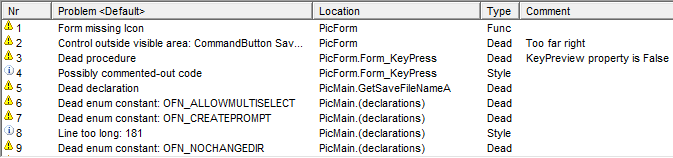
Problem list
Project Analyzer does an automated code review to detect programming problems and to suggest improvements. This feature is useful for optimization, quality control and automated coding standards enforcement. You can detect dead code and watch optimization suggestions, style issues, logic flaws, functionality problems, metrics limits and VB.NET compatibility issues.
Code review rules exist in many types.
Problem options are settings that let you select which code review rules you want to use. Use pre-defined problem filters or create to custom filters that cover those problem categories you are interested in. To hide a problem on certain lines, write comment directives.
Problem list
To fix problems, get a Problem report and work on your code. Auto-fix can automatically repair a part of the problems, remove dead code and add a comment about those problems that cannot be fixed automatically.
Select the code review rules you want to use in Problem options. Use pre-defined problem filters or create to custom filters that cover those problem categories you are interested in.
To hide a problem on certain lines, write comment directives.
Code review is part of all Project Analyzer editions. Certain review rules are limited to specific editions only.