Optimize string handling in VB6 - Part II
Make your Visual Basic apps process text fast as lightning. Part II of this article dives deep into the performance of the VB6 String functions. We learn the functions to use and the ones to avoid. We also learn how to call the Windows Unicode API functions and how to build really, really huge strings without crashing our VB6 apps.
As told in Part I, you can use many tricks to make VB6 process strings faster. We are now going deeper into the details of fast and robust string programming.
VB6 functions in this article: Asc, AscB, AscW,
Chr$, ChrB$, ChrW$, CDbl, CInt, CStr, InStr, InStrRev, LCase$, Left$,
Len, LenB, LTrim$, Mid$, Replace, Right$, RTrim$, Str$, StrPtr, Trim$,
StrComp, StrConv, UCase$, Val, VarPtr.

Memory layout of VB6 strings
To get some background, let's see how strings are stored in RAM. VB6
stores strings in Unicode format. In COM terminology, a VB String is a
BSTR. A String requires six overhead bytes plus 2 bytes for
each character. Thus, you spend 6 + Len(string)*2 bytes for each string.
The string starts with a 4-byte length prefix for the size of the string. It's not the character length, though. This 32-bit integer namely counts the number of bytes in the string (not counting the terminating 2 zero bytes). After the length prefix comes the actual text data, 2 bytes for each character. The last 2 bytes are zeros, denoting a NULL terminator (a Unicode null character).
| Field | Length prefix | Datastring | Terminator | |||||||||
|---|---|---|---|---|---|---|---|---|---|---|---|---|
| Byte | ... | |||||||||||
| Num bytes | 4 | 2*Length | 2 | |||||||||
| Value | Num_bytes | Unicode characters | NULL | |||||||||
Let's see how a sample string "Aivosto" is stored:
| Field | Length prefix | Datastring | Terminator | |||||||||||||||||
|---|---|---|---|---|---|---|---|---|---|---|---|---|---|---|---|---|---|---|---|---|
| Byte | ||||||||||||||||||||
| Num bytes | 4 | 2*7 | 2 | |||||||||||||||||
| Value | 14 | A | i | v | o | s | t | o | NULL | |||||||||||
NULL character note. It is perfectly valid to store a NULL character in the string. As the string length is stored in the first 4 bytes, you can store NULLs in the string data. They will not be treated as the terminating NULL as in C/C++.
BSTR note. BSTR is the COM datatype for a string pointer. The pointer points to the first character of the datastring, not to the length prefix.
Performance of simple string functions
We are now going to measure how fast the various built-in string functions of VB6 really are. For this purpose we compiled a little .exe, which called each function 100 million times. The test was run on a typical Pentium 4 processor (2.8 GHz). We found out that Len and LenB are the fastest functions. So we compared the rest of the functions to Len/LenB and put the results in the chart and table below.
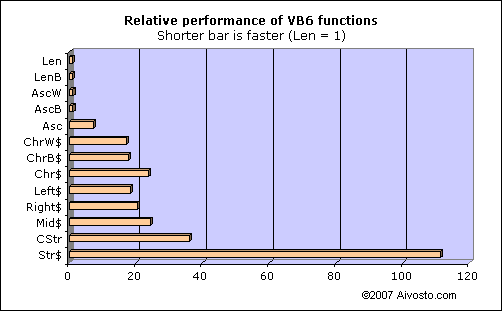
| Function | Time | Description |
|---|---|---|
Len | 1 | Len(S) returns the number of characters in string S.(Note: works differently with UDTs) |
LenB | 1 | LenB(S) returns the number of bytes in S. |
AscW | 1 | AscW(S) returns the Unicode value of the first character in S. |
AscB | 1 | AscB(S) returns the first byte in S. |
Asc | 7 | Asc(S) returns the ANSI value of the first character in S. |
ChrW$ | 17 | ChrW$(U) returns a string containing the Unicode character U. |
ChrB$ | 18 | ChrB$(B) returns a byte string containing the character B. |
Chr$ | 24 | Chr$(A) returns a string containing the ANSI character A. |
Left$ | 18 | Left$(S,x) returns x characters from the start of S. |
Right$ | 21 | Right$(S,x) returns x characters from the end of S. |
Mid$ | 24 | Mid$(S,x,y) returns y characters from S, starting at the xth character. |
CStr | 36 | CStr(x) returns the string representation of x (localized). |
Str$ | 111 | Str$(x) returns the string representation of x (not localized). |
How to read the table: Calling Len takes 1 unit of time, while Asc takes 7 units. You can call Len 7 times in the same time Asc executes just once.
Len and LenB. The fastest functions are Len and LenB. These are lightning fast functions that simply read the 2 length bytes at the start of the string area. Len is implemented in 6 assembly instructions in the VB runtime. LenB is even shorter: it runs just 5 instructions. In principle, LenB should run faster. In practice, this is not the case. Their performance is equal on today's processors.
AscW, AscB and Asc. This group of functions is very fast as well. Note how Asc takes 7 times the time of AscW and AscB. This is because AscW and AscB simply return the first byte(s) of the string. Asc needs to convert the value to an ANSI character code. You can squeeze more performance out of your program by replacing Asc with AscW. Since Asc and AscW return different values for many characters (other than ASCII 0–127), you need to know what you are doing before choosing the other function. Read Part III for more on this topic.
ChrW$, ChrB$ and Chr$. Performance degrades as we move to functions that create strings. This group of functions creates a string out of a numeric character code. Note how Chr$ takes about 40% more time to run than ChrW$. This is because Chr$ converts from ANSI to Unicode while ChrW$ works with pure Unicode values. You can squeeze more performance out of your program by replacing Chr$ with ChrW$. Since they return different characters for many values (other than 0–127), you need to know what you are doing before choosing the other function. Read Part III for more on this topic.
Left$, Right$ and Mid$. Performance keeps at the degraded level with this group of functions. These functions create new strings by copying some characters in the input string. These are the only functions that can access the individual characters in a string. As you can see, Mid$ is slower than Left$ or Right$. This means you should use Left$ and Right$ when possible and only resort to Mid$ when you really need to access characters in the middle.
Tip. To access the first character in a string, call AscW(S) instead of Left$(S,1). This will save you 95% of the time of running Left$. There is a caveat, though. S must not be empty. If S is empty, you will trigger a run-time error. Therefore, you need to make sure S is not empty by testing it with Len(S) or LenB(S) first. This is the proper way: If LenB(S) Then x = AscW(S)
CStr and Str$. These slow functions are used to convert other data types to a string. You typically use them to convert a numeric value into a string. CStr is much faster than Str$. (Tested for integer input value 32.)
You can save time by replacing calls to Str$ with CStr. This is not a straightforward task, though, because CStr and Str$ return different values. CStr returns a localized string while Str$ returns a non-localized one. What is more, Str$ prefixes positive values with a space. As an example, CStr(1.2) returns "1,2" in several European locales. Str$(1.2) always returns " 1.2". Thus, you can trust that Str$ always works the same way, while CStr works differently in different locales. If you simply replace calls to Str$ with CStr, your program may fail later if it fails to interpret the resulting localized string. The following table compares Str and CStr in the Finnish locale. The results will look similar in several other non-English locales.
x |
Str$(x) |
CStr(x) |
|---|---|---|
| 1.2 | " 1.2" | "1,2" |
| .2 | " .2" | "0,2" |
| -.2 | "-.2" | "-0,2" |
Performance of string functions, group 2
The next group consists of functions whose performance vary based on what you feed them as input. Generally speaking, the longer the input string, the slower the call. Performance drops considerably with longer strings.
The following chart reports timings for two input strings S defined as follows:
- Short input
- S consists of 21 characters: 10 spaces, "1" and 10 spaces.
S = " 1 " - Long input
- S consists of 201 characters: 100 spaces, "1" and 100 spaces.
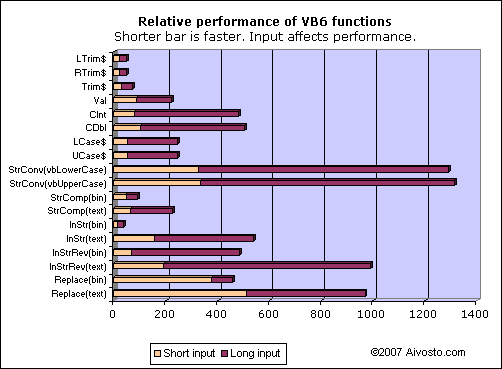
So, for the call Replace(text), the performance was 513 using the short input
string and 968 using the long input. The table below presents the
numeric performance values for the short input.
| Function | Time | Description |
|---|---|---|
LTrim$ | 20 | LTrim$(S) returns a copy of S without leading spaces. |
RTrim$ | 21 | RTrim$(S) returns a copy of S without trailing spaces. |
Trim$ | 29 | Trim$(S) returns a copy of S without leading or trailing spaces. |
Val | 89 | Val(S) returns the numeric value contained in S (non-localized). |
CInt | 81 | CInt(S) returns the integer value contained in S (localized, rounded). |
CDbl | 103 | CDbl(S) returns the double floating point value contained in S (localized). |
LCase$ | 53 | LCase$(S) returns a copy of S with lower case letters. |
UCase$ | 53 | UCase$(S) returns a copy of S with upper case letters. |
StrConv [vbLowerCase] | 327 | StrConv(S, vbLowerCase) returns a copy of S with lower case letters. |
StrConv [vbUpperCase] | 333 | StrConv(S, vbUpperCase) returns a copy of S with upper case letters. |
StrComp [vbBinaryCompare] | 47 | StrComp(S1, S2, vbBinaryCompare) compares string S1 and S2 based on their Unicode values. |
StrComp [vbTextCompare] | 65 | StrComp(S1, S2, vbTextCompare) compares string S1 and S2 in a locale-dependent, case-insensitive way. |
InStr [vbBinaryCompare] | 14 | InStr(x, S1, S2, vbBinaryCompare) looks for S2 in S1, starting at position x, in a locale-independent, case-sensitive way. |
InStr [vbTextCompare] | 156 | InStr(x, S1, S2, vbTextCompare) looks for S2 in S1, starting at position x, using text comparison. |
InStrRev [vbBinaryCompare] | 69 | InStrRev(S1, S2, x, vbBinaryCompare) looks for S2 in S1, from position x back to 1, in a locale-independent, case-sensitive way. |
InStrRev [vbTextCompare] | 193 | InStrRev(S1, S2, x, vbTextCompare) looks for S2 in S1, from position x back to 1, using text comparison. |
Replace [vbBinaryCompare] | 375 | Replace(S1, S2, S3, x, y, vbBinaryCompare) replaces S2 with S3 in S1, starting at position x, max y times, in a locale-independent, case-sensitive way. |
Replace [vbTextCompare] | 513 | Replace(S1, S2, S3, x, y, vbBinaryCompare) replaces S2 with S3 in S1, starting at position x, max y times, using text comparison. |
LTrim$, RTrim$ and Trim$. This useful group of functions removes spaces from the start or the end of the input string, or both. The more spaces there are, the slower they run. These functions return a copy of the input string.
Tip 1. Never nest like LTrim$(RTrim$(S)). Simply call Trim$(S) instead.
Tip 2. LTrim$ is the fastest alternative to test whether string S contains any non-space characters. Use this syntax:
Len(LTrim$(S))<>0
Val, CInt, CDbl. This is a group of relatively slow conversion functions. They look for a number inside a string. Val is a non-localized version that is best used together with Str$. CInt and CDbl are localized versions that are compatible with CStr. Val is a safe function to call, while CInt and CDbl raise error 13 when conversion fails.ʾ
It is best to avoid costly conversion where possible. Always pass numeric values in numeric data types, not as strings. By converting numbers to strings and strings to numbers you spend extra CPU cycles and also risk error 13 if your code is not designed the right way.
LCase$, UCase$, StrConv(vbLowerCase),
StrConv(vbUpperCase). This group of functions performs case
conversion. LCase$ is the faster alternative to StrConv(vbLowerCase).
UCase$ is the faster alternative to StrConv(vbUpperCase).
Keep in mind that LCase$ and UCase$ have full Unicode support,
whereas StrConv(vbLowerCase) and StrConv(vbUpperCase) don't support all
Unicode characters. In fact, calls to StrConv(vbLowerCase) and
StrConv(vbUpperCase) can remove diacritic marks from Latin characters
and convert unsupported characters to "?". As an example,
StrConv(vbLowerCase) converts all Greek and Cyrillic characters to
garbage on a Western system.
Tip. Avoid StrConv(vbLowerCase) and StrConv(vbUpperCase). There is no
reason to use these slow and limited calls. If you see them used,
replace them with LCase$ or UCase$. If there is a chance of a Null value
in the input, use LCase or UCase. The dollar versions LCase$ and
UCase$ will fail if the input is Null.
StrComp. The StrComp function compares two strings. The vbBinaryCompare option is faster than vbTextCompare.
Tip. vbTextCompare should only be used for sorting. vbTextCompare is often used to test for a case-insensitive match (test if "ABC" is equal to "abc"), but it is not suitable for that. This is because the result depends on the current locale. Certain character combinations can produce false matches. For example, StrComp("ss", "ß", vbTextCompare) returns 0. This means "ss" and "ß" are a match, which may not be what you intended to do. For a real case insensitive test (without extra effects), use something like LCase$(S1) = LCase$(S2).
StrComp(vbTextCompare) can produce other surprises as well. In the following table you can see how StrComp sorts certain characters in the Finnish locale (as an example). This serves as a proof of why vbTextCompare is not simply the case insensitive counterpart of vbBinaryCompare. It affects much more than just the case.
StrComp [vbBinaryCompare] |
StrComp [vbTextCompare] |
|---|---|
| All locales | Finnish locale |
| a < ae < z < ä < æ | a < ae = æ < z < ä |
| va < vb < wa | va < wa < vb |
| AE < ae < Æ < æ | AE = ae = Æ = æ |
| OE < oe < Œ < œ | OE = oe = Œ = œ |
| ss < ß | ss = ß |
| TH < th < Þ < þ | TH = th = Þ = þ |
| d < e < Ð < ð | d < Ð = ð < e |
Note that Option Compare Text is the equivalent of
vbTextCompare. Option
Compare Binary is the equivalent of vbBinaryCompare.
It is also the default setting.
InStr. InStr(,,vbBinaryCompare) is a quick function. Its counterpart InStr(,,vbTextCompare) is very slow, on the other hand. This is where it really pays off to use a binary search.
As with StrComp, vbTextCompare with InStr is full of
surprises. To name an example,
InStr(1,"Straße","ss",vbTextCompare) locates "ß" at
position 5. You searched for 2 characters, but InStr found just one!
What is this? The character "ß" stands for "ss" in the German language.
But, if your program was expecting the 2 characters "ss" or "SS", it can
fail now. — Similarly,
InStr(1,"Þingvellir","th",vbTextCompare) locates
"Þ". This happens because the character "Þ" stands for "th"
in Icelandic. Again, you searched for 2 characters, but InStr found just
one. These are not the only examples. You get the same behavior for
æ and œ. Don't use vbTextCompare unless this is
what you really want.
There is a separate article on the InStr function with detailed information about text comparison.
| Locate a substring | InStr(S, x) |
Locates x in S |
| See if string contains a substring | InStr(S, x) <> 0 |
Tells us if S contains at least one x |
| See if character is one of alternatives | InStr("ABC", S) <> 0 |
Tells us if S is one of "A", "B" or "C" ( Len(S) must be 1) |
| See if string is one of alternatives | InStr("-AB-CD-EF-", "-" & S & "-") <> 0 |
Tells us if S is one of "AB", "CD" or "EF" (S must not contain "-") |
InStrRev. Also InStrRev has
much better performance with vbBinaryCompare than with
vbTextCompare.
InStrRev is a lot slower than a regular InStr. This difference is
especially big with the vbBinaryCompare option. Searching for the middle
character in our 21-character short input string, InStrRev spent 5 times
the amount InStr spent.
InStrRev's performance also drops
considerably when the input string is long, that is, when there is a lot
to search in. It seems that InStrRev has a bad implementation.
Tip. Avoid InStrRev because of the bad performance. It may make sense to
replace calls to InStrRev with InStr at times. Example: If the input is
known to contain two TABs and you wish to find the latter one, it may be
faster to call InStr twice rather than InStrRev once.
Replace is a slow function. As with the other text
functions, vbBinaryCompare has better performance than
vbTextCompare.
If a replace is unlikely to occur, you can add performance by not
calling Replace unnecessarily. First test with InStr whether a replace
is required, and then only call Replace if a replacement is about to
happen. Thus, if you need to replace "£" with "€", first test with
InStr if there really is a "£" in the input string. Only call Replace if there was.
Empty string vs. null string
As you probably know having read this far, there are two ways to represent a zero-length string:
- the null string:
vbNullString - the empty string:
""
As far as pure VB6 programming is concerned, they work quite exactly
the same way. The only differences are that vbNullString is
faster and it saves 6 bytes of memory.
What exactly makes vbNullString different from
""? It's the way they are stored.
The empty string ("") consumes 6 bytes of memory. You can see the memory layout in the table below. All of the bytes are overhead bytes. There are no data bytes as there are no characters to store. The Datastring field, which normally appears between the Length prefix and Terminator fields, is missing. Its length is zero.
| Field | Length prefix | Terminator | ||||
|---|---|---|---|---|---|---|
| Byte | ||||||
| Number of bytes | 4 | 2 | ||||
| Value | 0 | NULL | ||||
What is the memory layout of vbNullString? The answer:
nothing! There is nothing to store, because vbNullString is
simply a NULL pointer. Besides a zero pointer, there is nothing else to
store. For the empty string, there is a non-zero pointer and a real
6-byte string allocated in RAM.
Now let's see what happens when you store a null string and an empty
string in variable S. The null string is stored as a null pointer. The
only thing to store in S is a zero. To store the empty string
"", VB needs to do more. VB will allocate an empty string
in the memory and set S to point to it. Thus, we consume both the
pointer and the data area. You can see the difference in the table
below.
| Pointer | Data | StrPtr(S) | VarPtr(S) |
||
|---|---|---|---|---|---|
S = vbNullString | 0 | (no data) | 0 | 1308564 | |
S = "" | 1568888 | ⇒ | 6 bytes | 1568888 | 1308564 |
S = "a" | 1568888 | ⇒ | 8 bytes | 1568888 | 1308564 |
| Memory address | 1308564 | 1568888 |
In the table, variable S is stored as a pointer at memory address 1308564.
- When you let
S = vbNullString, the pointer value is set to zero. Nothing else is stored. - When you let
S = "", the value 1568888 is stored at address 1308564. Now S points to the data area at 1568888. As it happens, this area contains 6 overhead bytes for the empty string"". - Compare the empty string to a regular non-empty string. When you let
S = "a", it is stored exactly the same way as"". Again, S points to the data area at 1568888. In this area you can find the actual string "a", which takes 8 bytes.
There is a difference in using "" vs. vbNullString. The difference is with API calls. Some API calls may accept only the other. Check out the API documentation before switching to vbNullString. VB itself doesn't make this difference.
Getting string pointers
VB6 supports two functions for getting pointers to strings.
VarPtr(S) returns a pointer to the variable
S. That memory location contains a pointer (BSTR) to the
actual string data. This means VarPtr essentially returns a pointer to a
pointer.
StrPtr(S) returns a pointer to the actual
string data currently stored in S. This is what you need when
passing the string to Unicode API calls. The pointer you get points to
the Datastring field, not the Length prefix field. In COM terminology,
StrPtr returns the value of the BSTR pointer.
API calls with Unicode strings
A lot of Windows API procedures come in two versions: ANSI and Unicode. The Ansi versions end in 'A' while the Unicode versions end in 'W'. The W stands for wide (wide characters).
VB6 supports the ANSI 'A' versions. When calling a Declare Sub or Declare Function, VB automatically converts String parameters from Unicode to ANSI. This means you safely use As String parameters in your Declare statements as long as you work with ANSI functions.
Declare Sub MySub Lib "x" Alias "MySubA" (Text As String)Unfortunately VB6 doesn't directly support the Unicode 'W' functions. You can pass a Unicode string quite easily, though. This is how you declare the Unicode version:
Declare Sub MySub Lib "x" Alias "MySubW" (ByVal Text As Long)This is how you pass the Unicode string:
MySub StrPtr(Text)You simply wrap the String parameters in StrPtr. That's how simple it really is! The API procedure gets a pointer to a Unicode string, not a copy of the string. By passing your strings as a pointer, you avoid the costly automated conversion to ANSI. What is more, your code is not restricted to the current ANSI character set, but can use the full range of Unicode characters. This is important with truly international applications.
Building huge strings
VB6 lacks a StringBuilder class for the creation of large strings.
Consider building a big string in a loop. An example is when you load a text
file line by line:
Do Until EOF(FileNr)
   Line Input #FileNr, Line$
   Big$ = Big$ & Line$ & vbNewline ' Bad!
Loop
You repeatedly copy stuff to the end of the string with the
concatenation operator &. The bad news is, VB is not
optimized for this. As you grow the string, VB repeatedly copies Big$
over and over again. This really degrades performance when repeated. VB
constantly allocates new space and performs a copy.
The problem gets worse as the string exceeds 64K in size. Small strings are stored in a 64K string cache. As the string becomes larger than the cache, performance drops considerably.
Order of concatenation
Big$ = Big$ & "abc" & "def"   ' 1: Default order
Big$ = Big$ & ("abc" & "def") ' 2: Short strings first
On line 1 above, VB will first join Big$ and "abc". After this, it will perform
another copy to add "def" to the end.
If the variable Big$ is big, the same is better rewritten with parentheses around
the shorter strings. The trick here is that you avoid copying the
contents of Big$ twice. On line 2, VB will combine "abc"
& "def" first before making a single slow copy of Big$.
Avoiding concatenation
You can avoid the slow run-time concatenation by using constants:
Const TWO_NEWLINES = vbNewline & vbNewlineString constants are stored in the executable in their entirety. There will be no concatenation when your program executes.
Sometimes you cannot use a constant. You can still initialize a variable when your program starts and use the value where required:
Public EscapeSequence As String
EscapeSequence = ChrW$(27) & vbCr ' ESC CR
Building large strings with CString
A good approach to building large strings is provided in a class called CString, originally published in Francesco Balena's article in Visual Basic Programmer's Journal. Designed as a "string builder" class, CString is a nice replacement for big VB strings. It is easy to use and its performance is great.
- CString original article, VBPJ, January 1999.
- The CString source code has been published online, but you may need to search for it.
CString stores the string in a byte array. As you add text to the string, CString allocates more space from time to time. Because it allocates far less often than VB, CString performs much better than a regular string.
The bad news is, CString works in ANSI. It stores the string in a byte array, one byte per character. While this saves memory, it doesn't work well with all international characters. Being ANSI means CString will silently convert your characters to something else. This isn't what you want if your strings are going to contain any characters outside of the current codepage. This means, CString doesn't handle international text.
Fortunately, it's possible to make CString work in Unicode. You need to change the byte array storage to an integer array, meaning two bytes per character. While this doubles the memory requirement, it ensures CString will work with all possible characters and not cause any nasty effects.
Building a huge string in a file
As your strings grow really, really huge, CString will not be enough. Memory allocation will eventually fail, even if there is free RAM available. The limit varies but there is a point where you get Error #7: Out of memory and your application is likely to crash. Maybe it's 50 MB or 300 MB, but Out of memory can hit your application as well. This can happen if your program produces large reports, logs, web pages, XML or other textual data files by building the data in a regular string variable before writing it to a text file. What can you do to keep your program running?
Save directly to a text file. Stop keeping the string in RAM. Write your string data to a file instead. If you are creating a report or an HTML page, for example, it's better to write the text directly to a file rather than building the text in a string variable and writing to disk afterwards.
Temporary text file. Writing text directly to a file isn't always an option, especially when existing code should be rewritten and you want to avoid a rewrite like the plague. This is where you can build a helper class. Let's call the class FileString. The class will use CString (or any other similar solution) as the default storage, the regular RAM string. As you append text to FileString, the class will store the text in the RAM string. If the string grows larger than a certain limit (say 1 MB), the FileString class creates a temporary file and dumps the RAM string in it. It then clears the RAM string to accept more stuff. You go on appending stuff to the RAM string. Every now and then FileString will store the RAM string into the temporary file.
Once you're ready, you can have FileString save the resulting huge string to a file. This is as simple as copying the temporary file into the final file. If there is any text left in the RAM string, that text is simply appended to the end of the final file.
This way you can build virtually unlimited strings, even exceeding the amount of available RAM.
The FileString solution is especially nice when you can't tell if the string will be small or large. When the string is small, it will be built in RAM. When the string is large, it will go onto the disk. There is no limit to the string data. You can be certain your code will run as long as there's free space on the disk.
Optimize string handling in VB6 - Part II
URN:NBN:fi-fe20071001