VB Watch v2: Profiler, Protector and Debugger for VB6
Take cover from run-time errors. Test, debug and profile your code. Increase the quality, stability and performance of your Visual Basic 6.0 programs.
VB Watch is three tools in one: Profiler, Protector and Debugger. Profiler measures performance and test coverage. Protector implements robust error handling. Debugger helps monitor your executables. Download demo
VB Watch Profiler
Measure speed and coverage
Where are the bottlenecks? VB Watch Profiler lets you measure execution speed. See what procedures are the slowest ones, and which lines or loops are taking up most of the time. Or measure execution times before and after your enhancements.
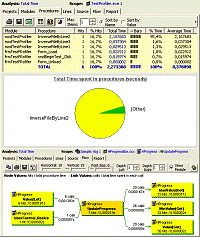
Test coverage. Are you sure you tested all your code? VB Watch Profiler records your tests as you execute them. It shows you in red what procedures and lines are still untested.
Make sure you've tested all the Select Case branches and nested If..Then..Else blocks too.
VB Watch Protector
The best error handling ever
No more mysterious error messages and crashes! No more yelling users! Find bugs the easy way. VB Watch adds advanced error handlers to your code with a few clicks, keeping your existing handlers fully enabled.
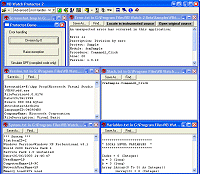
Error messages can include: error description, procedure name, line number, parameter and variable values, object properties, call stack, screenshot, run-time library versions, and even execution trace procedure-by-procedure, line-by-line.
Have the users email all this info immediately when an error happens. This is the fastest way to fix bugs ever discovered.
Stop guessing. VB Watch tells you exactly where the bug is lurking!
VB Watch Debugger
Trace compiled apps
Does your code behave as it should when compiled? Debug compiled code!
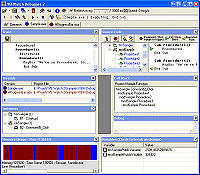
Trace the procedure calls and executed code lines in your compiled apps. Even better, monitor and pause your app. See its status. What line is it on? What procedures were called with what arguments? Call stack? Which objects are alive? What global variable values are in effect? Setup breakpoints to your exe, dll or ocx and see what's really happening in it.
VB Watch Debugger allows remote debugging at client site via TCP/IP.
VB Watch Console
Automate VB Watch
The instrumentation console allows you to batch process projects with predefined settings.
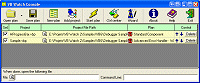
VB Watch Console works together with VB Watch Profiler, Protector and Debugger. Run the Console to instrument one or more projects in a batch.
You can optionally call the Console from a batch file to add error handling in a fully automated way. You can have it run each time before you compile your program for the end-users.
VB Watch v2 works with Visual Basic 6.0. It does not support other languages such as VBA, VB.NET or C#.
All generated code is 100% pure VB source. You don't need to distribute any extra run-time libraries, unless you use some advanced Protector features.
How to use
Learn the benefits of VB Watch.
Online Help
Browse the help to learn the details of VB Watch.
Download demo
The free demo is fully functional for projects with up to 10 source files.
Extend the demo
Get a key to use the demo on your larger projects.
VB Watch editions
VB Watch comes in two editions: Standard and Enterprise. Pick one and order now!
| Standard Edition | = | Profiler + Protector |
| Enterprise Edition | = | Profiler + Protector + Debugger + Console + Profiler reports + Profiler data export |
| Feature | Description | StdStandard | Enterprise |
|---|---|---|---|
| Profiler | Measure performance and test coverage. | Yes | Yes |
| Profiler reports & export | Report and export profiling data. | no | Yes |
| Protector | Add error handling. | Yes | Yes |
| Debugger | Monitor executables. | no | Yes |
| Console | Automate instrumentation process. | no | Yes |
| Price for single user (tax excl) | US$249 | US$499 | |
- Licensing is per developer. Run-time royalty free for users of your own software. License terms
- Single user license permits one person to use the software on one or more computers.
- Site license covers any number of users in a single organization within a radius of 3 miles (5 km).
System requirements: Windows and Visual Basic 6.0. No support for VB.NET or VBA.