VB Friend (discontinued)
Product discontinuation notice
VB Friend is no longer available. VB Friend was an add-in for Visual Basic 6.0. Originally released in 1999, VB Friend was discontinued in 2024 as part of a normal product lifecycle. We thank all our customers who have chosen VB Friend. Existing licenses are still valid.
 Add indentation, complete missing code, auto-correct, backup and get more desktop space. VB Friend works as add-in to Visual Basic 6. With VB Friend you code faster than ever.

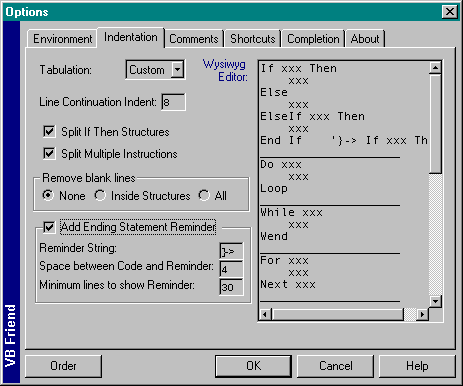
Straighten the spaghetti code. Add readability to your code by consistent indentation. VB Friends takes your rules to indent your code with your very own style.
Add missing variables. Tired of defining variables? Add Option Explicit and let VB Friend do the rest. Every time VB finds a new, undefined variable, VB Friend pops up asking for proper declaration.
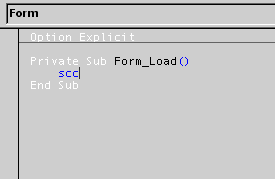
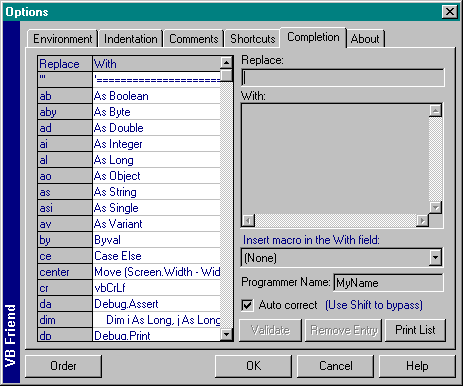
Auto-correct. Upgrade your Visual Basic editor with speedy macros. Type "scc" and get a full Select Case..Case..Case Else..End Select. Type "ite" and get a full If..Then..Else..End If ready to fill in!
Fully customizable for all single and multiline code snippets.
Type less. Let VB Friend complete any missing End If, End Select or Next i statements.
Get more screen space. VB Friend hides VB toolbars automatically when you don't need them. To show them, just move your mouse to where the toolbar was.
Get rid of "syntax error". Each time VB finds a syntax error it will show you an annoying message box. If you don't need those trivial messages, let VB Friend hit OK for you.
Quick backup. Backup your project to a .zip file. Make sure you always have working source code and enough interim copies while you work.
And more features. Quickly navigate backward and forward in your code and forms. Close all code and form windows instantly. Use Bracket Helper to determine which ")" is missing. Drag code to/from Temporary window to move it from place to place. Auto-clear the Debug window. Add 10 extra clipboards that persist between coding sessions and you get an idea of what to expect.
Indentation and code completion
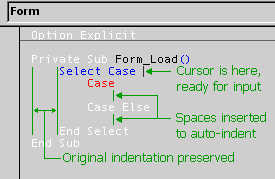
Indent your code automatically. Set indentation rules and have VB Friend make your code easy to read.
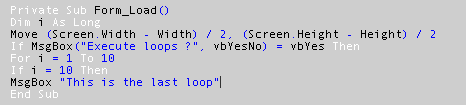
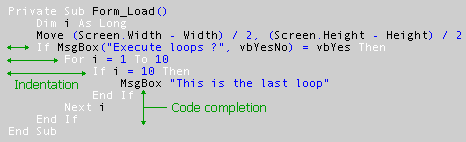
If any End If or Next statements are missing, VB Friend will complete them for you.
Auto-correct
Save time with auto-correct macros.
System requirements
VB Friend v2 is a Visual Basic 6.0 add-in. It requires VB6 installed. VBA is not supported.
Supported operating systems: Windows 95, 98, ME, NT, 2000, XP.
Windows Vista, 7, 8 and 8.1 support is not guaranteed. You may be unable to start the add-in or use certain features. To install VB Friend on Windows 7, please run setup.exe in XP compatibility mode. You may need to disable UAC (User Account Control) and also run VB6 in WinXP SP3 compatibility mode. On Windows Vista, installation may turn out problematic. Existing users who have upgraded their operating system to Windows Vista can continue to use VB Friend when UAC (User Account Control) is disabled.
Windows 10 is incompatible with VB Friend. It doesn't run on Windows 10. No fix is available either.
Download
The last version of VB Friend was v2.0.5.
Download VB Friend v2.0.5 demo
Fully functional for projects with less than 10 files.
License types
Single user license: one copy of VB Friend may either be used by a single person who uses the software personally on one or more computers,or installed on a single workstation used nonsimultaneously by multiple people, but not both.
Team license covers 1-5 users in a single organization.
Site license covers a single organization for an area of up to one hundred miles (160 km) in radius.
You may access the full version of VB Friend through a network, provided that you have obtained individual licenses for the software covering all workstations that will access the software through the network. For instance, if 8 different workstations will access VB Friend on the network, each workstation must be licensed, regardless of whether they use VB Friend at different times or concurrently.