Mainframes: Analyzing IBM legacy systems
To maintain, migrate or rewrite existing legacy system one needs to understand their structure and functionality. Gathering in-depth knowledge on existing complex, potentially undocumented code takes time without proper tools. This article presents Visustin, a helpful utility for getting in-depth knowledge of existing legacy code.
Have you ever inherited a large mess of code? There's no documentation and the people who built the system left the company 10 years ago? Not a problem. You just need proper tools to understand the system and do your job. To understand the structure and functionality of existing code you need diagramming and analysis tools that help you dig all relevant information and business rules from the system.
Visustin is a tool to analyze legacy code. Be the code in COBOL, Assembler, PL/I, JCL or anything else, Visustin helps in analyzing old IBM mainframe systems.
Why analyze legacy systems?
Legacy code analysis helps answering the following needs:
- Document the undocumented. A large number of systems are inadequately documented. There are no comments, diagrams or reports. If there are, they are outdated and incorrect. To understand what the program really does, in-depth analysis is required to document its operation. Manually documenting everything is a large operation. Tools are required to help.
- Maintain old systems. One shouldn't service a legacy application before really understanding what it does. A simple change can easily lead to new errors and devastating results. New errors can emerge somewhere else in the program. Analysis tools help locating dependencies effects before they result in nasty bugs.
- Reuse or migrate existing code. Analyze the code to see if parts of it can be modernized or reused as a part of a newer system.
- Understand business rules. You should document the actual business logic as opposed to the business rules believed to be in place. This way you know what is running in production instead of relying on what one thinks is running in production. Easier said than done, isn't it? This really is where you benefit from using good tools.
- Manage the ripple effect. Seemingly small software modifications can ripple throughout a system that can cause major unintended consequences and impacts other parts of the system. This is known as the ripple effect. To manage the ripple effect in complex systems one can use specialized tools.
Visustin, the flow chart generator
Visustin is a Windows tool that creates flow charts from raw source code. You load your code in the tool and press a button to view it in flow chart format. The flow charts can be printed or saved as program documentation. There is even a flow chart editor for manual flowcharting and an option for automated batch processing.
Visustin supports a large number of mainframe languages such as COBOL, JCL, Fortran, PL/I and Rexx. It is not limited to legacy languages, though. The support covers tens of languages from widely used languages such as C/C++ or Java to specialized ones such as SAS or Matlab.
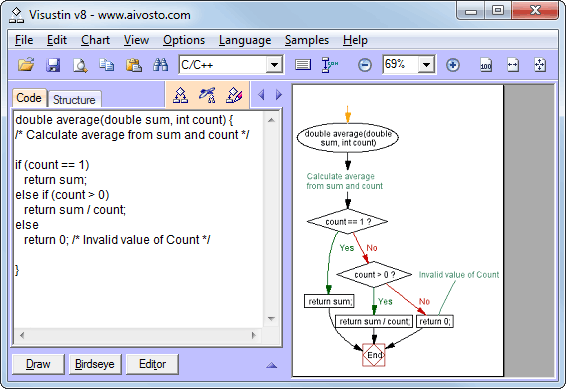
With Visustin you document implemented business rules as a flow chart. You can also edit the rules graphically in flow chart mode. Flow charts are readily understandable by people who are not fluent in the target language. This means that business logic can be examined without first gaining significant experience with the environment.
Flow charts allow for visual comparison of two functions. Existing logic can be verified and new logic can be compared to an older version. In a migration project one can verify that the old and new version of an algorithm are similar, even when they are written in different languages.
Visustin is useful even in a mixed language environment where programmers need to understand several languages, even though they may not be able to write code in all of them.
Visustin samples
Let's have a look at some COBOL flow chart samples.