Visustin v8 Flow chart generator
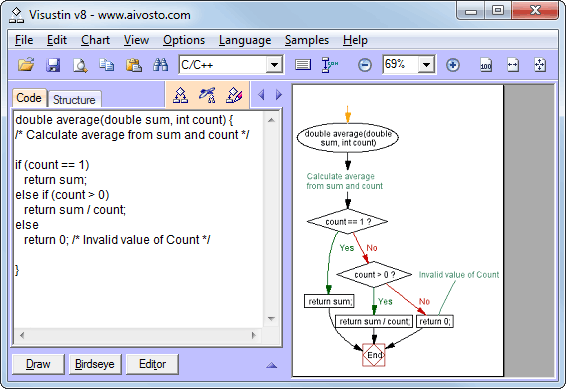
Visualize your source code with flow charts and UML Activity Diagrams. Visustin is flowcharting software that converts your source code to flow charts—automatically! Draw flow charts with your mouse. View and print charts or export to Visio.
 |
Convert source code $249 / $499 Understand and |
| Visustin flowcharts 49 languages | ||
|---|---|---|
|
|
|
| Orange languages are new in Visustin v8 | ||
| More languages available | ||
Need flow charts for another language? MPASM, R, Progress anyone? Add new language | ||
Visustin for software developers.
Visustin is an automated flow chart program for software developers and document writers.
Save documentation efforts with automatic code visualization. Visustin reverse engineers your source code to flow charts or UML Activity Diagrams.
Visustin reads the if and else statements, loops and jumps and builds a diagram—fully automated.
No manual drawing is required. Visustin flowcharts ABAP, ActionScript, Ada, ASP, several assembly languages, AutoIt, BASIC, .bat files, C, C++, C#, Clipper, COBOL, ColdFusion, Delphi, Fortran, GW-BASIC, HTML, Java, JavaScript, JCL (MVS), JavaServer Pages, LotusScript, MATLAB, MXML, Pascal, Perl, PHP, PL/I, PL/SQL, PowerBASIC, PowerBuilder PowerScript, PureBasic, Python, QuickBASIC, REALbasic, Rexx, RPG, Ruby, SAS, Tcl, TSQL, Unix shell script (bash, csh, tcsh, ksh, sh), VB, VBA, VBScript, VB.Net, Visual FoxPro, XHTML, XML and XSLT.
Visustin for document writers. Add flow charts to your project documentation. Clear diagrams instantly tell the reader what even the most complex code does. Save your efforts with automated documentation!
| Review algorithms | → Fix bugs |
| Follow complex logic | → Avoid bugs |
| Compare functions | → Find errors |
| Restructure bad code | → Add quality |
| Document programs | → Save effort |
| Read strange languages | → Reuse code |
Visustin for code review. Verify program logic with flow charts. Find bugs before the users do. Save costs by fixing bugs earlier than before.
Visustin for debuggers. Can't see the bug? View a flow graph to gain new insight and speed up debugging.
Visustin for software maintenance. Flowchart old functions to understand them before modifications. After writing changes, flowchart the new version to verify the algorithm. Improved quality guarantees happy users.
|
Convert languages. Converting old code to a new language? Avoid conversion errors. Flowchart both versions to detect any differences. Extract business rules from legacy code. Flowchart routines to document the rules embedded in them. Read an unfamiliar language. Visualize program logic even if the code is in a language you don't know well. Restructure old spaghetti code. Confirm the results with flow charts. Understand the incomprehensible. View convoluted code in a new light. Gained insight helps you fix old bugs and avoid adding new ones. |
Features
Flowchart code automatically. Visustin converts source code to flow charts automatically. An automated layout ensures visually optimal results. Just hit a key and you're done. The charts visualize your code and optionally the comments as well.
Edit flow charts. Visustin Editor lets you edit the automatically created charts. Insert comments, add shapes, highlight important points, adjust links, fine-tune the layout. [Pro Edition]
Draw flow charts manually. Visustin Editor lets you draw flow charts from scratch with the mouse. Document your business processes. Plan your systems before building them. [Pro Edition]
UML. Prefer UML style? No problem! Visustin supports both flow charts and UML Activity Diagrams.
Multi-page print. Print large flow charts as a multi-page mosaic. Squeeze to fit on one sheet.
PDF flow charts. Save high-quality PDF charts. They are great to zoom and pan.
Save charts. Use flow graphs in your project documentation. Save files in BMP, GIF, JPEG, PNG, TIFF, MHT, EMF or WMF format. Create web pages showing both the code and the flow chart.
Export to Visio. Save your drawing efforts. Convert your source code to Microsoft Visio diagrams. More about Visio export [Pro Edition]
Export to Word. Add flow charts to technical documents.
Bulk charting. Flowchart all your source files in one run. Create Visio diagrams unattended. Run flowchart jobs in a batch. Add automated flowcharting as a part of your application's build process. Keep your technical documents updated every night. [Pro Edition]
Download for free
Download demo
Download and try Visustin now. Free flowcharting trial software that diagrams all your code. No size limitation.
Print, Save and Export are disabled in the free demo. No problem! Use our free flowcharting service. We will save or export for you. Just send us some code. We can even send a PDF to print.
System requirements. Visustin runs on Windows.
More information
Editions
| Edition | Free demo | Standard Edition | Pro Edition |
|---|---|---|---|
| Create charts from code | Yes | Yes | Yes |
| - | Yes | Yes | |
| Save | - | Yes | Yes |
| Draw charts with Editor | - | - | Yes |
| Export to Visio | - | - | Yes |
| Bulk flowchart | - | - | Yes |
Pro Premium is Pro Edition with upgrade protection and activation guarantee.
Prices and licensing details
| Visustin v8 license | 1 user | 2-pack | 3-pack | Team (5) | 10-pack | |
|---|---|---|---|---|---|---|
| Standard Edition | $249 | $419 | $589 | $749 | $1149 | |
| Pro Edition | $499 | $839 | $1190 | $1490 | $2290 | |
| Pro Premium | $749 | $1290 | $1790 | $2290 | $3490 | |
| Standard Educational | $129 | |||||
| Standard 90 days temporary license | $99 | |||||
| Extra users beyond 3, 5 or 10: Standard Edition +$80, Pro +$160, Pro Premium +$240/user.
See Upgrade prices for discounts for existing users. |
||||||
| Site licenses | Site | |||||
| Pro Edition, site license | $5990 | |||||
| Pro Premium, site license | $8990 | |||||
| World-wide license: Please inquire. | ||||||
Try it for free. Download Visustin, a high-quality automated flowcharter. It makes sense of source code however bad and complex. Visustin is risk-free and comes with a full 30-day money back guarantee.
2 installations per license. A single user license covers one user and two computers. For 2 users one needs a 2-pack, for 3 users a 3-pack and so on. A site license allows 100 installations (geographical limitation applies). Other license sizes are available on request. Reinstallation is allowed if previous installations are removed first. Online activation is required before running the full software. Offline activation is possible through another, online computer. Activation is covered for 3 years after purchase. License and activation details
Upgrades. Minor updates are free within one major version number (8.xx → 8.yy). No free updates are guaranteed to come out. Major upgrades are discounted, see What's new in Visustin v8. Upgrade protection is available with a Pro Premium license.
Flowchart maker for abap, as, asm, asp, au3, bas, bat, c, cbl, cfm, cmd, cls, cob, cpp, cs, f, f77, f90, f95, frm, java, jcl, js, html, lss, m, mxml, pas, php, pl, pl1, pli, prg, py, rex, sas, sh, tcl, vb, vbs, xml, xsl and other files. Flow chart software to reverse engineer code, view flow diagrams, create Visio flow charts and debug algorithms. Built-in features: flowchart viewer, flow graph printer.