What's new in Visustin v8
Visustin v8 is a language and compatibility update for all existing users. New languages include AutoIt, GW-BASIC, PowerBASIC and RPG. Create tag charts from HTML and XML. Visustin v8 updates support for 21 languages, including modern JavaScript and the languages of Visual Studio 2015. Visustin v8 is compatible with Windows 10, Word 2016 and Visio 2016, and earlier. Whether you're working with modern or legacy code, Visustin v8 is a must for you.
Try & upgrade Upgrade prices Previous improvements
| Visustin flowcharts 49 languages | ||
|---|---|---|
|
|
|
| Orange languages are new in Visustin v8 | ||
| Offer: Add custom language | ||
Improvements in Visustin v8
See also: Visustin features and versions pdf
Visustin v8 is a long-awaited syntax and compatibility update with numerous smaller improvements helping you create flow charts smoothly. The number of improvements is larger than in any previous version, yet there are no major changes ruining your experience. As an existing user you will feel totally at home with Visustin v8.
Language update. 6 new languages, 23 updated languages supporting newest syntax, newest commands and the like. Improvements for selected languages. Updates make sure your code flows correctly in the charts. See table below.
Word export update. Page size is adjusted to flow chart size. Export to DOC or DOCX file format.
Visio export update. Export to Visio 2016. Export to VSD or VSDX file format. Export "Flow chart alternative style". [Pro Edition]
Bulk charting update. HTML and MHT save formats rewritten. [Pro Edition]
Compatibility update. Visustin v8 is compatible with Windows 10, Visio 2016 and Word 2016, and earlier. Supports an improved look on high-density displays.
| Language | New support | Previous support | Improvements and fixes |
|---|---|---|---|
| ABAP | 751 | 702 | * |
| ActionScript | Semicolon-less code support | ||
| AutoIt | 3 | NEW language | |
| Batch files | DOS+Win7 | DOS+WinXP | Syntax update. Cmd, Runas, Forfiles |
| C | C11 | C99 | Many improvements |
| C++ | C++14 | C++98 | Many improvements |
| C# | VS2015 (C# 6.0) | VS2012 (C# 5.0) | Many improvements. catch..when, yield return, interpolated strings. |
| COBOL Fortran JCL PL/I | Fixed format support improved: Ruler. Indent and Unindent commands. | ||
| GW-BASIC | NEW language. Partial support updated to full support. | ||
| HTML | NEW language | ||
| Java | 8 | 7 | Many improvements |
| JavaScript | 2016 | 5.1 | Semicolon-less code, OO programming, prototype-based programming. Function and class expressions. |
| JSP | 2.3 | 2.1 | Many improvements |
| LotusScript | 9.0.1 | 8.5.2 | * |
| MASM | VS2015 | 6.1 | 10 new opcodes |
| MATLAB | R2016b | R2012b | * |
| NASM | v2.12.02 | 2.10.05 | 11 new opcodes |
| Perl | 5.24.0 | 5.16.0 | Syntax update. switch |
| PHP | 5.6, 7.0 | 5.4.6 | Syntax update. finally, yield |
| PL/I | Auto-detect column format | ||
| PL/SQL | 12c | 11g | Quoted identifiers |
| PowerBASIC | NEW language | ||
| PureBasic | 5.50 | 4.61 | Syntax update. Module, Macro, With, CompilerElseIf, ~".." strings. |
| Python | 3.5.2 | 3.2 | Syntax update. async, yield. More file encodings. |
| RPG | I II III IV | NEW language. Fixed, free and fully free format RPG. | |
| SAS | 9.4 | 9.3 | * |
| VB.NET | 2015 | 2013 | Syntax update. Yield, Exit Try, multiline strings, interpolated strings, comments in multiline statements. |
| XML | NEW language. XML, XHTML, DTD. | ||
| XSLT | 2.0 | 1.0 | Syntax update. xsl:analyze-string, xsl:for-each-group, xsl:function |
*) Language changes verified, no update was required.
Older language versions are still being supported, as always.
More improvements
Improved File associations: No administrative privileges required.
Improved Print Preview: Display page size.
Improved Save: Suggest default filename based on source filename.
Improved file load: Auto-detect UTF8 files, even when UTF8 header bytes are missing.
Improved file load: Auto-remove control characters from end-of-file. Useful with CP/M and other old sources.
Improved Font script: Automatic script detection for foreign letters and other special characters.
Improved Bulk [Pro Edition]: HTML and MHT file formats rewritten, and their option "Split files by Structure" renamed as "Structure menu".
Improved Bulk [Pro Edition]: C/C++/C#/Java/JSP/JavaScript/ActionScript filenames use procedure name instead of full declaration.
Removed features
Removed Visio 2002 export. Visio export now supports Visio from 2003 to 2016. [Pro Edition]
Removed save format: PowerPoint.
Removed save format: .flw.png. Regular FLW and PNG files can be saved. Existing .flw.png files can be loaded.
Detailed version history
Visustin features and versions pdf
Try & upgrade today
Download the free demo to
see this great upgrade.
Install the new version in a new directory. It co-exists with your current version.
To ensure minimum hassle, don't uninstall the new version. Just leave it there and keep using your current version.
Upgrade prices
| Visustin license | 1 user | 2-pack | 3-pack | Team (5) | 10-pack | Site |
|---|---|---|---|---|---|---|
| Visustin v8 Standard Upgrade | $129 | $209 | $289 | $369 | $569 | |
| Visustin v8 Pro Upgrade | $250 | $420 | $601 | $741 | $1141 | $2990 |
| Upgrade requires existing non-temporary Visustin license (same size or larger), any version, any edition. Extra users beyond 3, 5 or 10: Standard Upgrade +$40, Pro Upgrade +$80/user. |
||||||
Discounted upgrades are available from all versions of Visustin. You need an existing Visustin license of the same size (full upgrade). A partial upgrade to a smaller license is also allowed. As an example, from a 5-user license you can upgrade all 5 users or maybe only 1 or 2 users. To upgrade to a larger license, please ask for an offer.
Educational and temporary licenses. A previous version educational license can be upgraded to a regular, non-educational Standard or Pro Edition license. A temporary license cannot be upgraded.
2 installations per license. A single user license covers one user and two computers. For 2 users one needs a 2-pack, for 3 users a 3-pack and so on. A site license allows 100 installations. Other license sizes are available on request. Reinstallation is allowed if previous installations are removed first. Online activation is required before running the full software. Offline activation is possible through another, online computer. Activation is covered for 3 years after purchase of upgrade. License terms of v8 are very similar to those of v6/v7. License and activation details
A license upgrade terminates your existing license(s) in 30 days of upgrading. An upgrade to an equal or a larger license size terminates the previous license in full. A partial upgrade to a smaller license decreases the previous license accordingly.
Free minor updates are included within one major version number (8.xx → 8.yy), if any should come out.
Previous improvements in Visustin v7
You have Visustin v6 or earlier? Here are the improvements previously made to Visustin v7.
Save multipage PDF flow charts. Each procedure appears on its own PDF page. The alternative is a single-page PDF showing an entire source code file on one big page.
Alternative flow chart style. Choose between default flow chart symbols and alternative symbols.
Configure colors. Create a new color scheme for your charts. Translate labels.
New options. Display each statement in its own box. Control word wrapping inside chart symbols.
High-density display support. Run Visustin on high-density monitors such as Windows 7/8 font size "Larger 150%".
Visio export improved. Each procedure appears on its own Visio page, keeping diagrams more manageable. Previous versions put all procedures on a single big page. [Pro Edition]
Visio 2013 fully supported. [Pro Edition]
Windows 8 and 8.1 fully supported.
New and updated languages in v7
Visustin v7 added or updated a total of 21 languages. The new languages were: ABAP, ActionScript 3.0 and MXML, Batch files (DOS/Windows), Ruby, Shell script (sh, csh/tcsh, ksh, bash), Tcl.
More improvements in v7
Improved Language menu. Select favorite languages.
Improved support for ASCII control characters 0-31 and 127 in source code.
Improved command line: Language auto-detection. View effective command line options through Help menu.
Improved drag & drop: Drop a file onto language dropdown to auto-detect language.
Improved display: Use smoother ClearType enabled font in dialogs. (Microsoft Sans Serif)
Improved Find: Search in the Structure panel too.
Improved Save PDF: Page numbering improved.
Improved Save PDF and Editor: Improved appearance of certain shapes.
Improved robustness with large charts.
Improved Bulk flowcharting [Pro Edition]: Bulk runs in a small window, leaving more screen space for your other programs. Write bulk log file. Sort files alphabetically in mht and tiff archives.
Removed features in v7
Removed Windows 98 and ME compatibility.
Removed save formats: PPM, PGM, PBM, PCX, TGA, PNG with code, GIF with code, TIFF with code, TIFF archive with code.
Visustin continues to load all previous version file formats. Visustin continues to save as regular PNG, GIF and TIFF.
Previous improvements in Visustin v6
You have Visustin v5 or earlier? Here are the improvements previously made to Visustin v6.
Flowchart large and complex files. Visustin processes even your largest files. A previous 3000-line limit has been lifted.
Flowchart individual procedures via the new Structure panel. Load your file, select the functions and press Draw. This feature replaces the need to select lines of code with the mouse or keyboard.
Save PDF flow charts. High-quality PDF is the perfect way to view, zoom and pan flow charts. Save a single-page PDF for viewing on the screen. Alternatively, save a paged PDF for printing. This feature replaces the need to print on a PDF printer driver. Besides, the PDF feature uses high-resolution vector graphics. No more jagged bitmap output. Samples
High-quality print-outs. Print-outs have been rewritten. Print at high resolution and quality. Optimized layout minimizes page break effects. Print-outs now have a much sharper look and feel. Better resolution also means you can fit more chart on a single sheet.
Bulk save each procedure into its own flow chart file. Instead of a giant diagram, you can now create many small flow charts out of a single source file. Feature implemented for most languages. [Pro Edition]
New and updated languages in v6
Added JCL (MVS), Matlab, PL/I, Rexx and SAS.
COBOL: Process much larger programs into meaningful flow charts.
JavaScript and VBScript: Both languages now support embedded scripting on ASP pages (server-side scripting) and HTML pages (client-side scripting). There is also a new VBScript mode.
More improvements in v6
Improved Editor flow chart layout to minimize page break effects.
Improved Save as EMF and WMF image quality.
Improved Save as MHT to support larger images.
Improved export to Word to use vector graphics.
Improved layout by replacing clusters (large boxes) with new symbols.
Improved display of Arabic letters.
Removed features in v6
Removed save formats: Multi-page GIF and DCX (use TIFF), HTML with GIF (use PNG), PostScript (use PDF).
Removed Windows NT4 compatibility.
Previous improvements in Visustin v4 and v5
You have Visustin v3, v4 or earlier? Here are additional improvements made to Visustin v4 and v5.
Visio export layout improved. Get the optimal Visustin-style layout in Visio as well. Straight links. Visio export runs in the background. Keep working on other charts meanwhile. [Pro Edition]
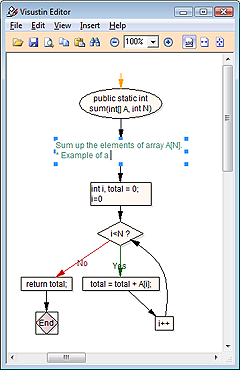
Visustin Editor. Visustin Editor lets you edit the flow charts. Insert comments, add shapes, highlight important points, adjust links, fine-tune the layout. You can even draw diagrams from scratch. [Pro Edition]
Flow chart jobs. Execute pre-defined bulk charting jobs. Run Visustin from a batch file in unattended mode. [Pro Edition]
Export to Word. Transfer flow charts to .doc and .docx files.
UML Activity Diagrams. Visustin now has an option to build UML2 style diagrams instead of the regular flow chart style. See example below. Samples
Save TIFF image files.
Bulk save MHT and TIFF archives. Put all charts in one file for painless archiving. [Pro Edition]
Load flow charts back in Visustin. Visustin functions as an image viewer.
Metrics. Check out the cyclomatic complexity and decision density of your flow chart. More
New options in v4 and v5
Option to show compiler directives (#if..#else) with decision symbols. Selected languages only.
Option 'Truncate long lines' keeps chart size down while showing most code.
Option 'No code' reveals program structure without showing any code.
Option to display comments with only short or no code.
Other improvements in v4 and v5
Improved layout.
Improved Find: Case sensitive search, Whole word search.
Codepage support including DOS, Mac, EBCDIC, UTF-7, UTF-8 and UTF-32.
New languages in v4 and v5
Added assembly language, Clipper, ColdFusion, LotusScript, PowerScript, PureBasic, Python, REALbasic, Visual FoxPro and XSLT.