Aivosto — Programming Tools for Software Developers

Visustin

Project Analyzer

Visustin Project Analyzer

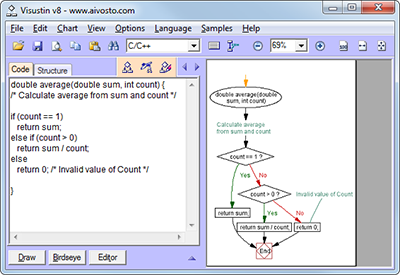
Visustin v6: Flow chart generator

Visualize your code with flow charts. Visustin converts source code to flow charts and UML activity diagrams. Create Visio flow diagrams and PDF charts. Flowchart your source files in an automated way. Review algorithms. Verify program logic. Document complex functions. Restructure incomprehensible code.

Convert code to flow charts and document programs!

Visustin supports 36 languages:

Ada, ASP, assembler, C/C++, C#, Clipper, COBOL, ColdFusion, Delphi, Fortran, Java, JavaScript, JCL (MVS), JSP, LotusScript, Matlab, Pascal, Perl, PHP, PL/I, PL/SQL, PowerScript, PureBasic, Python, QB, REALbasic, Rexx, SAS, T-SQL, Visual Basic, VBA, VBScript, VB.NET, Visual FoxPro and XSLT.

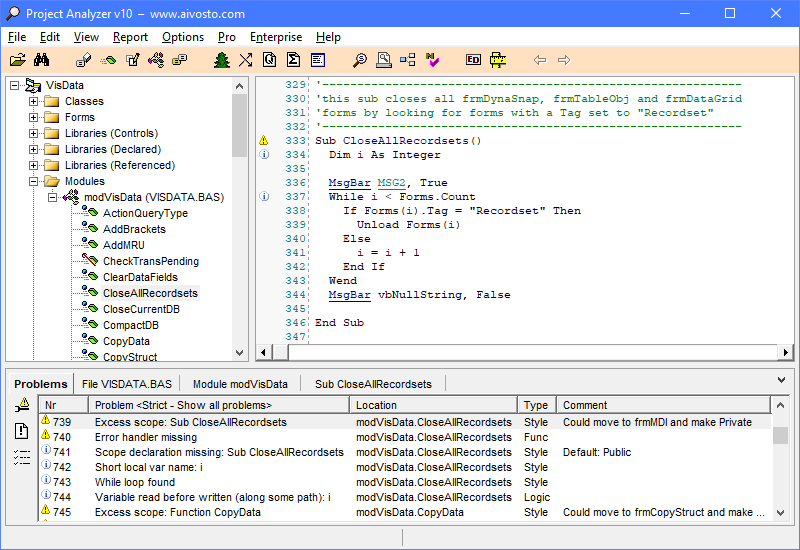
Project Analyzer v10: Code review for VB

Find bad code in Visual Basic, VB.NET and VBA projects. Detect flaws, bad syntax and unoptimalities. Remove unused code. Evaluate class design. Enforce programming standards. Generate documentation and diagrams. Print code. Navigate code via links. List cross-references. Perform change impact analysis. View metrics.

Improve code quality and cut development costs!

Automated code review
Delete unused dead code
Enforce coding standards
Find questionable logic and bad syntax

Automated code documentation
Create diagrams and reports
List cross-references and call trees
Surf hyperlinked code

New in v6: PDF flow charts

Flowchart your most complex files. Or just individual functions. What's new

New in v10: Reveal rotten VB logic

Project Analyzer v10 finds logic mistakes in VB code. Supports VB 2010. What's new

VB Watch screenshot

VB Watch v2: Profile, debug, handle errors

VB6 run-time analysis and monitor. Evaluate performance and detect bottleneck code. Measure test coverage and find unexecuted lines. Avoid mysterious crashes – add professional error handlers to your code. Identify bugs with detailed error reports. Monitor executables and debug remotely.

More programming utilities

ActiveXplorer Library file viewer and manager
VB Friend Go overspeed with VB6
Product catalog
Ascii7 Unicode-to-ASCII conversion module
Eval Expression evaluator and math parser for VB
RegExpr Regular expressions for VB/VBA

News

Visustin v6 Pro Premium available

(05/2012) Visustin is now available with a Pro Premium license. Add upgrade protection, activation guarantee and priority support. Get the most out of your flow chart generator!

Ascii7 converts Unicode text to ASCII

(03/2012) Ascii7 is a Unicode-to-ASCII conversion module for programmers. It converts any Unicode string to 7-bit ASCII preserving information. Drop diacritics. Remove accents and umlauts. Replace special symbols with pure ASCII. Convert Cyrillic and Greek letters to their Latin equivalents. Ascii7 is an easy way to support good Unicode-to-ASCII conversion in your own applications.

Ascii7

Control characters in ASCII and Unicode

(10/2011) Tens of odd control characters appear in ASCII and Unicode charts. CR, LF, ESC, CAN... what are all these codes for? Should I care about them? This is an in-depth look into control characters in ASCII and its descendants, including Unicode, ANSI and ISO standards.


Flow chart symbols

(08/2011) Flow charts are a useful tool for software documentation. This article introduces flow chart symbols for source code visualization. These symbols let you visualize the structure of a function, statement by statement.

More news

Newsletter keeps you updated.

RSS

Featured programming articles

Reduce errors with parameters

Many programming errors are related to improper use of procedure parameters. Declare parameters properly in order to avoid unnecessary errors in your Visual Basic programs.

Dead code detection

Increase quality, decrease files and save money by removing unused, dead code. Dead code means unnecessary, inoperative code that can be – and should be – removed. The opposite of dead code is live, operational code.

Optimize string handling in VB6 - Parts I–III

String handling in Visual Basic 6 is slow if done the wrong way. You can add significant performance to string operations by following some easy rules.
Part I - General string optimization.
Part II - Performance of functions. API calls.
Part III - Extracting substrings and examining characters.

More development articles and resources

Write us!

How do you like our software? Have any questions? We hope to hear from you! Contact Aivosto.

Company information

This website was previously known as VBShop.

©Aivosto Oy -